

WebRTC 下载源码并编译为动态库
记录一次 macOS 系统下载WebRTC源代码和编译(踩坑)的全过程
1. 安装 depot_tools 工具包
depot_tools是 google 开发的管理 Chromium 源代码的工具,因此,我们需要首先安装depot_tools
git clone https://chromium.googlesource.com/chromium/tools/depot_tools.git
使用如下命令检测是否需要翻墙
curl www.google.com
如果出现错误,需要使用 VPN 软体辅助下载,终端并不会自动识别 VPN 所走的端口,需要我们单独配置,这里我使用的是v2ray如下图所示: 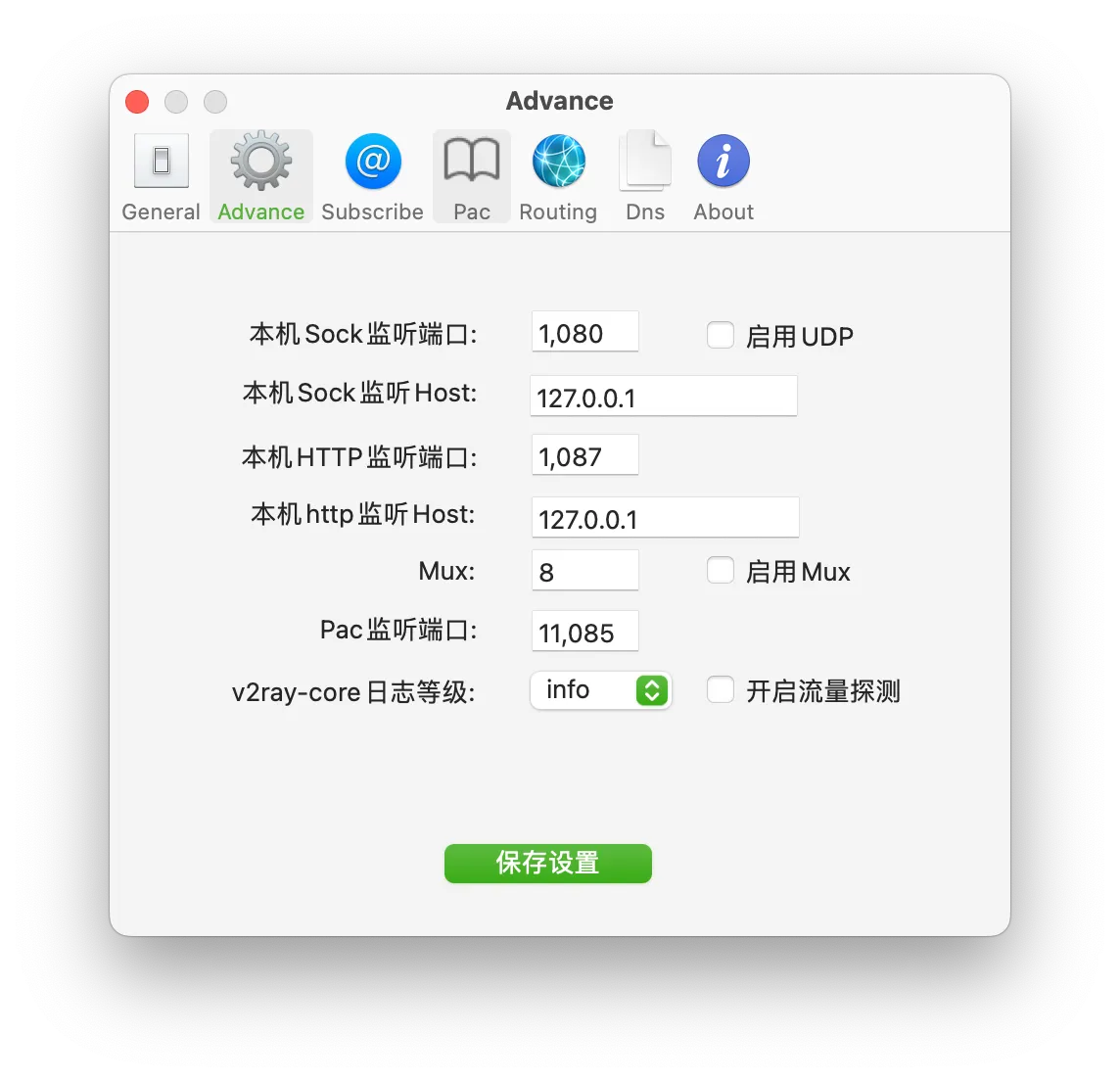
如图中所示,VPN 使用的 Sock 为127.0.0.1:1080,终端使用zsh,因此为方便随时在终端可以快速开关 VPN,需要在~/.zshrc中进行配置,如果使用的bash同理可以在~/.bash_profile配置,具体如下:
vim ~/.zshrc
在结尾处添加(有坑,后面会提到)
# proxy
alias proxy_on='export all_proxy=socks5://127.0.0.1:1080'
alias proxy_off='unset all_proxy'
含义是创建了两个快捷指令,在终端输入proxy_on和proxy_off便可以用于终端快速启用和关闭翻墙,当然前提是提前打开翻墙软件。
如果发现命令执行不了可以使用
source ~/.zshrc
这是因为对于已经打开的终端,修改是不会自动应用的。上面的命令可以应用所有更改,当然你重新打开一下终端,两者作用相同。
结果
(base) sarah@MBP WebRTC % git clone https://chromium.googlesource.com/chromium/tools/depot_tools.git
Cloning into 'depot_tools'...
remote: Finding sources: 100% (9/9)
remote: Total 59597 (delta 39218), reused 59594 (delta 39218)
Receiving objects: 100% (59597/59597), 58.57 MiB | 5.10 MiB/s, done.
Resolving deltas: 100% (39218/39218), done.
2. 安装 depot_tools 工具包
添加环境变量
export PATH=/path/to/depot_tools:$PATH
我的路径是/Users/sarah/Documents/WebRTC/depot_tools,所以执行
export PATH=/Users/sarah/Documents/WebRTC/depot_tools:$PATH
每次重新打开终端该配置就会失效,检测是否安装成功
fetch --help
个人遇到的问题
这里我发现自己运行失败了,并且遇到了问题
xxx/WebRTC/depot_tools/vpython3: line 52: xxx/WebRTC/depot_tools/.cipd_bin/vpython3: No such file or directory
xxx/WebRTC/depot_tools/vpython3: line 52: exec: xxx/WebRTC/depot_tools/.cipd_bin/vpython3: cannot execute: No such file or directory
在搜索之后,通过一则 github 的issue中找到了解决方法,也与前面的翻墙有关,如果正常可以操作请忽略此步骤。
前面我使用的sock5配置的翻墙软件,需要把127.0.0.1替换成localhost即可。使用http的同理,并且注意一定要是http://开头而不是https://。 出现这个问题的原因可能是127.0.0.1没有正确解析、或 IP 地址没有被代理软件正确捕获所导致。
# proxy
alias proxy_on='export all_proxy=socks5://localhost:1080'
alias proxy_on2='export all_proxy=http://localhost:1087'
alias proxy_off='unset all_proxy'
重新运行fetch --help
(base) sarah@qinStonedeMBP webrtc-checkout % fetch --help
usage: fetch.py [-h] [-n] [--nohooks] [--nohistory] [--force]
                [-p PROTOCOL_OVERRIDE]
                config ...

    This script can be used to download the Chromium sources. See
    http://www.chromium.org/developers/how-tos/get-the-code
    for full usage instructions.

positional arguments:
  config                Project to fetch, e.g. chromium.
  props

options:
  -h, --help            show this help message and exit
  -n, --dry-run         Don't run commands, only print them.
  --nohooks, --no-hooks
                        Don't run hooks after checkout.
  --nohistory, --no-history
                        Perform shallow clones, don't fetch the full git
                        history.
  --force               (dangerous) Don't look for existing .gclient file.
  -p PROTOCOL_OVERRIDE, --protocol-override PROTOCOL_OVERRIDE
                        Protocol to use to fetch dependencies, defaults to
                        https.

Valid fetch configs:
  android
  android_internal
  angle
  breakpad
  chrome
  chromium
  config_util
  crashpad
  dart
  depot_tools
  devtools-frontend
  devtools-internal
  flutter
  gn
  gyp
  infra
  infra_internal
  infra_superproject
  inspector_protocol
  ios
  ios_internal
  nacl
  naclports
  node
  node-ci
  pdfium
  skia
  skia_buildbot
  syzygy
  v8
  webrtc
  webrtc_android
  webrtc_ios
  website
3. 下载 WebRTC 源码
参考网站:WebRTC 官网、WebRTC Native Code, iOS
下载代码
在官网上有写明
NOTICE: During your first sync, you’ll have to accept the license agreement of the Google Play Services SDK. The checkout size is large due the use of the Chromium build toolchain and many dependencies. Estimated size: Linux: 6.4 GB. Linux (with Android): 16 GB (of which ~8 GB is Android SDK+NDK images). Mac (with iOS support): 5.6GB
因此建议预留足够的内存空间。
mkdir webrtc-checkout
cd webrtc-checkout
fetch --nohooks webrtc_ios
执行完以后你就会惊喜的发现,不是哥们儿~我内存呢? 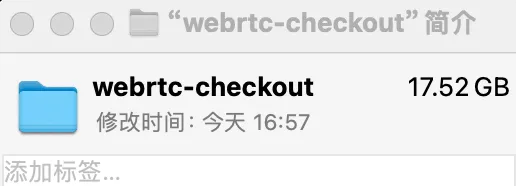
与远端代码同步执行以下命令
gclient sync
执行结果
(base) sarah@qinStonedeMBP webrtc-checkout % gclient sync
Syncing projects: 100% (49/49), done.
________ running 'python3 src/build/mac_toolchain.py' in '/Users/sarah/Documents/WebRTC/webrtc-checkout'
Skipping Mac toolchain installation for mac
Running hooks:  44% (13/29) clang
________ running 'python3 src/tools/clang/scripts/update.py' in '/Users/sarah/Documents/WebRTC/webrtc-checkout'
Downloading https://commondatastorage.googleapis.com/chromium-browser-clang/Mac/clang-llvmorg-19-init-10646-g084e2b53-1.tar.xz .......... Done.
Downloading https://commondatastorage.googleapis.com/chromium-browser-clang/Mac/clang-llvmorg-19-init-10646-g084e2b53-1.tar.xz .......... Done.
Hook 'python3 src/tools/clang/scripts/update.py' took 34.49 secs
Running hooks:  62% (18/29) dsymutil_mac_x64
________ running 'python3 src/third_party/depot_tools/download_from_google_storage.py --no_resume --no_auth --bucket chromium-browser-clang -s src/tools/clang/dsymutil/bin/dsymutil.x64.sha1 -o src/tools/clang/dsymutil/bin/dsymutil' in '/Users/sarah/Documents/WebRTC/webrtc-checkout'
NOTICE: You have PROXY values set in your environment, but gsutil in depot_tools does not (yet) obey them.
Also, --no_auth prevents the normal BOTO_CONFIG environment variable from being used.
To use a proxy in this situation, please supply those settings in a .boto file pointed to by the NO_AUTH_BOTO_CONFIG environment variable.
0> Downloading src/tools/clang/dsymutil/bin/dsymutil@05a1fbfceb62efb3ce10c94f1c7dd40b56e406f1...
Downloading 1 files took 22.052359 second(s)
Hook 'python3 src/third_party/depot_tools/download_from_google_storage.py --no_resume --no_auth --bucket chromium-browser-clang -s src/tools/clang/dsymutil/bin/dsymutil.x64.sha1 -o src/tools/clang/dsymutil/bin/dsymutil' took 22.17 secs
Running hooks:  68% (20/29) clang_format_mac_x64
________ running 'python3 src/third_party/depot_tools/download_from_google_storage.py --no_resume --platform=darwin --no_auth --bucket chromium-clang-format -s src/buildtools/mac/clang-format.x64.sha1 -o src/buildtools/mac/clang-format' in '/Users/sarah/Documents/WebRTC/webrtc-checkout'
NOTICE: You have PROXY values set in your environment, but gsutil in depot_tools does not (yet) obey them.
Also, --no_auth prevents the normal BOTO_CONFIG environment variable from being used.
To use a proxy in this situation, please supply those settings in a .boto file pointed to by the NO_AUTH_BOTO_CONFIG environment variable.
0> Downloading src/buildtools/mac/clang-format@0b4bd257a1f4cd27d27d6919b0f9e52ecdfa8f1e...
Downloading 1 files took 10.302379 second(s)
Hook 'python3 src/third_party/depot_tools/download_from_google_storage.py --no_resume --platform=darwin --no_auth --bucket chromium-clang-format -s src/buildtools/mac/clang-format.x64.sha1 -o src/buildtools/mac/clang-format' took 10.41 secs
Running hooks:  89% (26/29)
________ running 'download_from_google_storage --directory --recursive --num_threads=10 --no_auth --quiet --bucket chromium-webrtc-resources src/resources' in '/Users/sarah/Documents/WebRTC/webrtc-checkout'
NOTICE: You have PROXY values set in your environment, but gsutil in depot_tools does not (yet) obey them.
Also, --no_auth prevents the normal BOTO_CONFIG environment variable from being used.
To use a proxy in this situation, please supply those settings in a .boto file pointed to by the NO_AUTH_BOTO_CONFIG environment variable.
Hook 'download_from_google_storage --directory --recursive --num_threads=10 --no_auth --quiet --bucket chromium-webrtc-resources src/resources' took 699.90 secs
Hook 'vpython3 src/testing/generate_location_tags.py --out src/testing/location_tags.json' took 66.84 secs
4. 编译 WebRTC
进入到src目录中
cd src
使用 GN 产生 Ninja 工程文件,终端执行
gn gen out/ios_64 --args='target_os="ios" target_cpu="arm64"'
然后不出意外的话意外就发生了
(base) sarah@qinStonedeMBP src % gn gen out/ios --args='target_os="ios" target_cpu="arm64"' --ide=xcode
ERROR at //webrtc.gni:560:32: Assignment had no effect.
        xctest_module_target = "//test:google_test_runner_objc"
                               ^-------------------------------
You set the variable "xctest_module_target" here and it was unused before it went
out of scope.

Via these template invocations:
  rtc_test("rtc_unittests")  //BUILD.gn:635
  test("rtc_unittests")  //webrtc.gni:519
  mixed_test("rtc_unittests")  //testing/test.gni:887
  ios_app_bundle("rtc_unittests")  //testing/test.gni:166
  executable("rtc_unittests_executable")  //build/config/ios/rules.gni:614

See //build/config/ios/rules.gni:614:3: whence it was called.
  executable(_executable_target) {
  ^-------------------------------
See //testing/test.gni:166:5: whence it was called.
    target(invoker.target_type, target_name) {
    ^-----------------------------------------
See //testing/test.gni:887:5: whence it was called.
    mixed_test(_test_target) {
    ^-------------------------
See //webrtc.gni:519:3: whence it was called.
  test(target_name) {
  ^------------------
See //BUILD.gn:635:3: whence it was called.
  rtc_test("rtc_unittests") {
  ^--------------------------
很显然在 google-test 上出现了问题,直接暴力注释一下 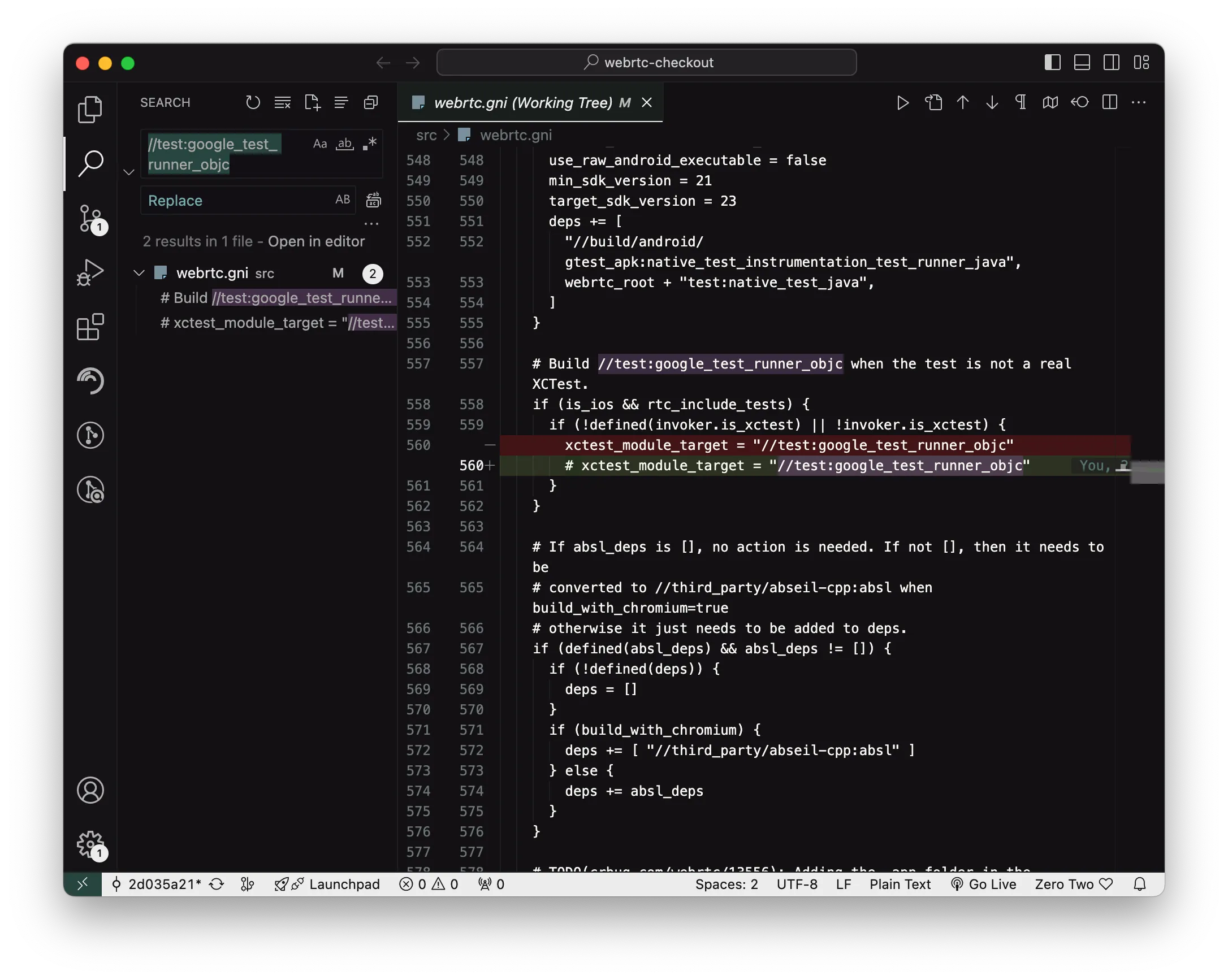 编译成功!
编译成功!
(base) sarah@qinStonedeMBP src % gn gen out/ios --args='target_os="ios" target_cpu="arm64"' --ide=xcode
Generating Xcode projects took 159ms
Done. Made 2545 targets from 349 files in 3796ms
这里将文件输出到了out/ios文件中,因此在使用 Ninja 时需要指明该文件目录
ninja -C out/ios AppRTCMobile
如果想通过 Xcode 运行需要在命令中增加一些参数,可以参考大佬的这篇博客,之后可能会再花些时间研究如何运行 demo,目前进度打算先通过使用 JS 编写 WebRTC 项目了解每个 Api 的功能与原理,并花时间查看源代码是如何实现。